
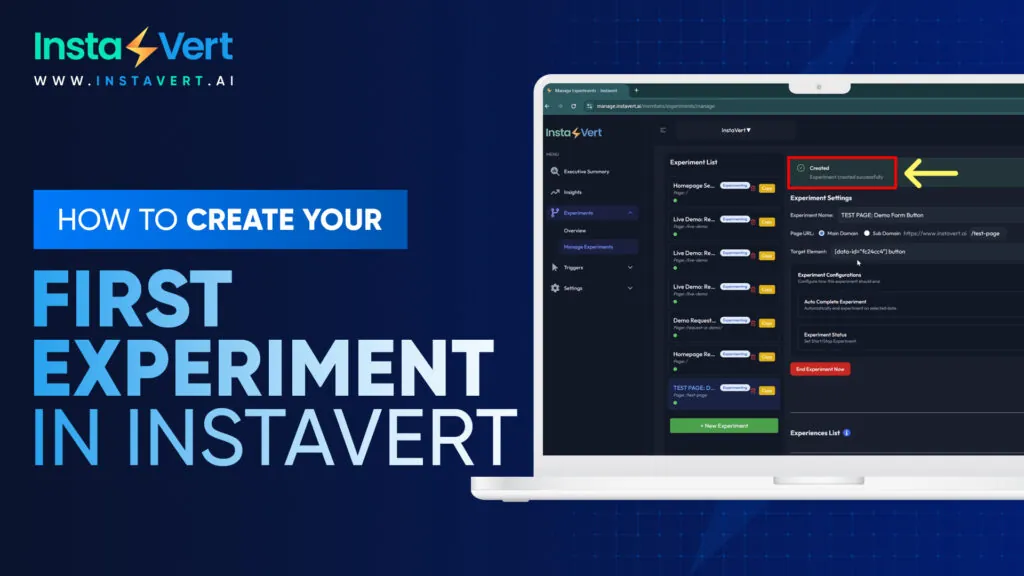
In this video, I’m going to show you how easy it is to get started with InstaVert and create your first experiment in a couple minutes. So we’re gonna go to the experiment section, manage experiments. These are the current experiments running on the website currently. We’re going to create a new experiment. We’re gonna name this experiment test page demo form button. We have the option of running this experiment on the main domain or a subdomain. For this experiment, we’re gonna stay on the main domain and we’re gonna run this experiment on the test page URL.
The select elements will allows you to simply select any element on the page versus having to look at the code itself and inject the code into InstaVert. We can simply select the button here, which is what we’re going to be conducting the experiment on. So when we click, request demo, we press confirm and that automatically gets pulled right into InstaVert. So no coding knowledge is needed there. From here we have options to auto complete the experiment. We can run the experiment for a few weeks for example and then have it have it end automatically and then this is the experiment status on or off. We’re going to obviously keep it on and we’re going to create the experiment.
So once we click create experiment, you’re gonna see an experience list generated below. And these are the different variants or experiences that we’re going to be testing. So we’re gonna test out that demo request button. We’re gonna put a few different variants in here. So we’re gonna include see an action. We’re gonna include explore the platform. And we’re going to include start optimizing today. And then once we’re happy with the different experiences in this list, we can save all experiences, save the experiment, and we should be live.
So we’re going to test this in incognito mode. This way we don’t run into any caching issues. And we’re going to go to the test page. And as you can see, the request of demo is now showing start optimizing today, which is one of the experiences that we decided to test. So that’s how easy it is to get started creating different experiments within Instavert. And then from there, you can go to the overview section and understand how many sessions have occurred within a certain time period. This is the last seven days, which is the winning experience, the conversion rate of the website in total based upon the conversion page that you set up, as well as the experience left by page type. And here we can look at a variety of different experiments that are currently running on the website and understand the data. So for example, this homepage request demo banner experiment is ongoing. We remove the session section, look at the different variants served, and the see in action was able to generate some conversions. So because it generated conversions, it’s being shown more. So if it’s a little lacking on the conversion side, it will start to produce more variants served or experiences served around these other variants to measure the engagement there. And that’s all there is to getting an experiment started in software.





 You'll be redirected to Stripe's secure payment page to complete your payment.